What is a Crypto Wallet? Complete 2026 Guide
📋 En bref (TL;DR)
- Definition: A crypto wallet doesn’t store your crypto — it holds your cryptographic keys (public and private) that prove your ownership on the blockchain
- Private key: Your “ultimate password” — NEVER share it with anyone, not even tech support. Whoever has it controls your funds
- Hot vs Cold: Hot wallet = connected to Internet (convenient but risky) / Cold wallet = offline (secure for long-term storage)
- Custodial vs Non-custodial: Exchange holds your keys (recoverable) vs You alone control them (total sovereignty)
- Golden rule: More than $5,000 in crypto → hardware wallet mandatory (Ledger, Trezor)
- Key takeaway: “Not your keys, not your crypto” — without your private keys, you own nothing
When you decide to invest in cryptocurrencies, the first question that arises is: where will I store my crypto? That’s where the crypto wallet comes in. Unlike a traditional wallet, a crypto wallet doesn’t actually store your cryptocurrencies, but rather the cryptographic keys that give you access to your funds on the blockchain.
Understanding what a crypto wallet is, how it works, and how to secure it is absolutely essential. A handling error can result in the permanent loss of your funds. Conversely, mastering wallets allows you to fully control your digital assets autonomously.
2x cheaper fees. Up to 6% yield. No seed phrase. Fibo, the wallet you've been waiting for.
Join the waitlist →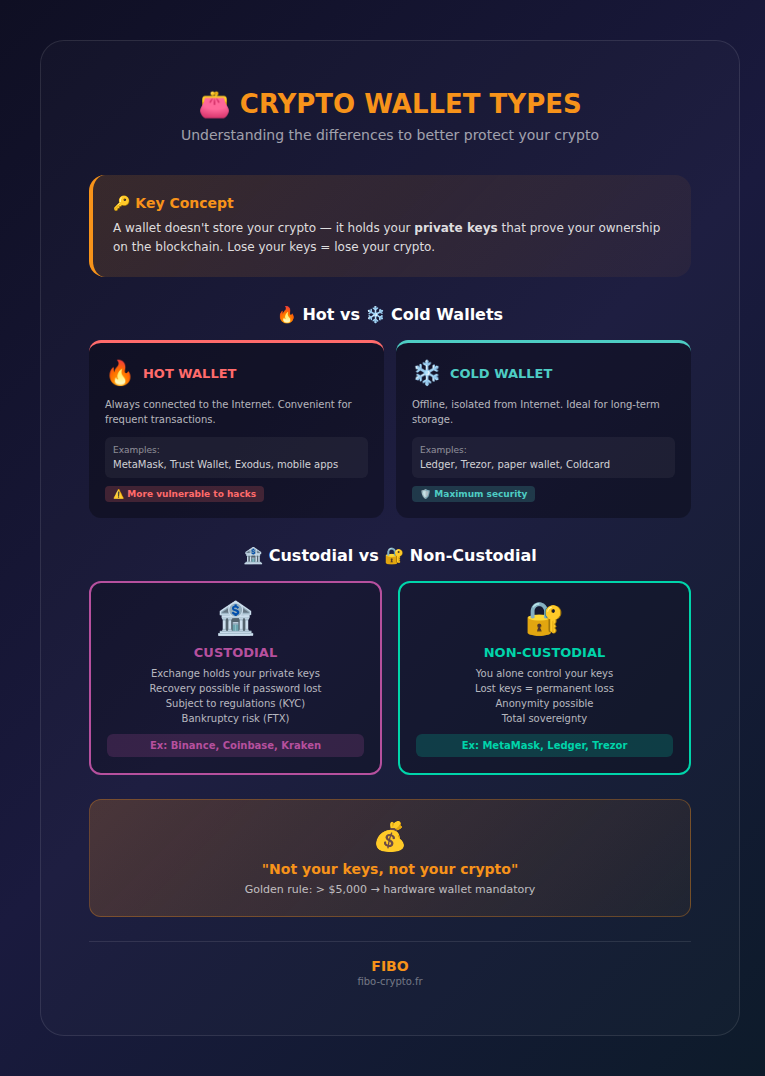
What Is a Crypto Wallet?
A crypto wallet is a software or hardware tool that stores your cryptographic keys — a public key (your address for receiving funds) and a private key (your “password” to spend them).
Crucial point: your cryptocurrencies are never stored in the wallet. They exist on the blockchain, and the wallet simply contains the keys that prove you are the legitimate owner.
Analogy to understand
Imagine the blockchain as a giant public bank where everyone can see all the vaults, but no one can open them without the right key. Your crypto wallet is like the keychain that gives you access to your personal vault. Without this keychain (your private keys), you cannot access your funds.
How Does a Crypto Wallet Work?
A crypto wallet works through asymmetric cryptography: it generates a pair of mathematically linked keys — a private key (secret) that signs transactions, and a public key (shareable) derived from it that serves as an address for receiving funds.
The public key (your address)
- Format: A long alphanumeric string (e.g., 0x742d35Cc6634C0532925a3b844Bc9e7595f0bEb)
- Function: Your “crypto address”, equivalent to your bank account number
- Security: Completely public, you can share it without risk
The private key (your access)
- Format: A 256-bit string (64 hexadecimal characters)
- Function: Signs transactions and proves your ownership
- Security: NEVER SHARE IT — whoever has it controls your funds
The seed phrase (recovery phrase)
The seed phrase is a sequence of 12 or 24 words that can regenerate all your private keys. It’s your ultimate backup. If you lose your device but have your seed phrase, you can recover all your funds.
Hot Wallets vs Cold Wallets
🔥 Hot Wallets
Hot wallets are connected to the Internet at all times. They’re convenient for daily transactions but more vulnerable to attacks.
Types of hot wallets:
- Mobile wallets: MetaMask, Trust Wallet, Exodus (smartphone apps)
- Desktop wallets: Electrum, Exodus (PC/Mac software)
- Web wallets: Browser extensions like MetaMask
Pros: Instant access, free, intuitive interface
Cons: Vulnerable to hacks, malware, phishing
❄️ Cold Wallets
Cold wallets store your keys offline, safe from Internet attacks. They’re recommended for long-term storage of significant amounts.
Types of cold wallets:
- Hardware wallets: Ledger Nano, Trezor, Coldcard (physical devices)
- Paper wallets: Keys printed on paper (not recommended today)
Pros: Maximum security, keys never exposed online
Cons: Cost ($50-200), less convenient for frequent transactions
Custodial vs Non-Custodial
🏦 Custodial Wallets
With a custodial wallet, a third party (usually an exchange) holds your private keys for you. This is the case when you leave your crypto on Binance, Coinbase, or Kraken.
Pros:
- Recovery possible if password forgotten
- Simple interface, no need to manage keys
- Customer support available
Cons:
- You don’t really control your crypto
- Risk of exchange bankruptcy (FTX, Mt. Gox)
- Subject to regulations and account freezes
🔐 Non-Custodial Wallets
With a non-custodial wallet, you alone control your private keys. No one can access your funds without your permission — but no one can help you if you lose your keys.
Pros:
- Total sovereignty over your assets
- No third-party bankruptcy risk
- Anonymity possible
- Access to DeFi and dApps
Cons:
- Lost keys = permanent loss of funds
- Total responsibility for security
- Steeper learning curve
How to Choose Your Wallet?
Based on amount held
- Less than $500: Free hot wallet (MetaMask, Trust Wallet)
- $500 – $5,000: Hot wallet + good security practices
- More than $5,000: Hardware wallet mandatory (Ledger, Trezor)
- More than $50,000: Multisig or multiple hardware wallets
Based on your usage
- Active trading: Hot wallet for speed + cold storage for reserves
- Long-term HODLing: Hardware wallet exclusively
- DeFi / NFTs: MetaMask or dApp-compatible wallet
Essential Security Rules
✅ Golden rules
- NEVER share your seed phrase — not even with “tech support”
- Write your seed phrase on paper — never as a photo or digital file
- Always verify the destination address before sending
- Test with a small amount before any large transfer
- Use a hardware wallet for significant amounts
⚠️ Fatal mistakes to avoid
- Storing seed phrase online (cloud, email, photo)
- Clicking suspicious links promising airdrops
- Downloading unofficial wallets
- Connecting wallet to unknown sites
- Trusting “support” that contacts you first
Best Wallets in 2026
Recommended hardware wallets
- Ledger Nano X (~$150): Bluetooth, 100+ cryptos, very popular
- Ledger Nano S Plus (~$80): Budget version, excellent value
- Trezor Model T (~$220): Touchscreen, open source
- Trezor One (~$70): Reliable entry-level
Recommended hot wallets
- MetaMask: Essential for Ethereum and DeFi
- Trust Wallet: Multi-chain, intuitive interface
- Exodus: Sleek design, built-in exchange
- Phantom: Go-to for Solana
📚 Glossary
- Private key : Secret 256-bit code that signs transactions and proves ownership of your crypto. Must NEVER be shared.
- Public key : Address derived from the private key, shareable to receive crypto. Equivalent to a bank account number.
- Seed phrase : Sequence of 12 or 24 words that can regenerate all your private keys. Ultimate wallet backup.
- Hot wallet : Wallet connected to the Internet at all times. Convenient but more vulnerable to attacks.
- Cold wallet : Wallet storing keys offline. Maximum security for long-term storage.
- Hardware wallet : Physical device dedicated to secure storage of private keys (Ledger, Trezor).
- Custodial : Wallet where a third party (exchange) holds your private keys. You don’t really control your crypto.
- Non-custodial : Wallet where you alone control your private keys. Total sovereignty but total responsibility.
- Blockchain : Decentralized and immutable ledger where all crypto transactions are recorded.
- Digital signature : Cryptographic proof generated by your private key to authorize a transaction.
- Multisig : Wallet requiring multiple signatures (keys) to authorize a transaction. Enhanced security.
- dApp : Decentralized application running on a blockchain, accessible via a compatible wallet.
Frequently Asked Questions
What happens if I lose my wallet?
If you lose your device (phone, hardware wallet), you can recover your funds by importing your seed phrase into a new wallet. That’s why it’s crucial to backup this phrase in a safe place. Without the seed phrase, your crypto is lost forever.
Can a wallet be hacked?
A hot wallet can be compromised via malware, phishing, or security flaws. A hardware wallet is nearly impossible to hack remotely because the keys are never exposed online. The weak link is often the user (stolen seed phrase, scam).
Can I have multiple wallets?
Yes, and it’s even recommended! Common strategy: a hot wallet with few funds for daily transactions, and a hardware wallet for long-term storage of significant amounts.
Should I buy a new hardware wallet?
Absolutely! NEVER buy a used hardware wallet or from unofficial sites. It could be compromised with a seed phrase pre-generated by the seller. Only buy from ledger.com or trezor.io.
Is MetaMask safe?
MetaMask is a reputable and audited wallet, but like any hot wallet, it remains vulnerable if your device is compromised. To maximize security, connect MetaMask to a Ledger hardware wallet to sign transactions.
📰 Sources
This article is based on the following sources:
Comment citer cet article : Fibo Crypto. (2026). What is a Crypto Wallet? Complete 2026 Guide. Consulté le 24 March 2026 sur https://fibo-crypto.fr/en/blog/what-is-a-crypto-wallet/
The simplest way to buy, swap and manage your crypto
Join the first users and get priority access. No seed phrase, fees 3.5x lower, built-in DeFi yield.
Join the waitlist →