How to secure your crypto — The no-jargon guide (2026)
📋 En bref (TL;DR)
- In 2025, $3.4 billion in crypto was stolen — including $1.5B in the Bybit hack alone (the largest theft in history)
- 65% of thefts were caused by social engineering (phishing, scams) — not technical exploits
- France leads the world in crypto kidnappings: 40+ cases since 2023, including the co-founder of Ledger (finger severed, 10M EUR ransom)
- The 5 main threats: phishing (49% of losses), seed phrase theft, SIM swap, malicious approvals, fake wallet apps
- Where to store your crypto? Exchange = short-term / trading. Hot wallet = daily use. Cold wallet = long-term savings. Ideally: all three
- Seedless wallets (MPC, passkeys, TEE + Shamir) eliminate attack vector #1: seed phrase theft, responsible for 43.8% of losses
- The best protection isn’t an antivirus — it’s a security model that eliminates the single point of failure
- Security checklist: app-based 2FA (never SMS), verify URLs, revoke permissions on revoke.cash, never share your screen in “support” calls
- The 7 fatal mistakes: screenshotting your seed phrase, reusing passwords, ignoring updates, approving without reading, flaunting your wealth, skipping test transactions, no backup plan
- In France: check platforms against the AMF blacklist (France’s financial markets authority) and beware of fake tax authority SMS messages
$3.4 billion stolen in 2025 — the threat landscape
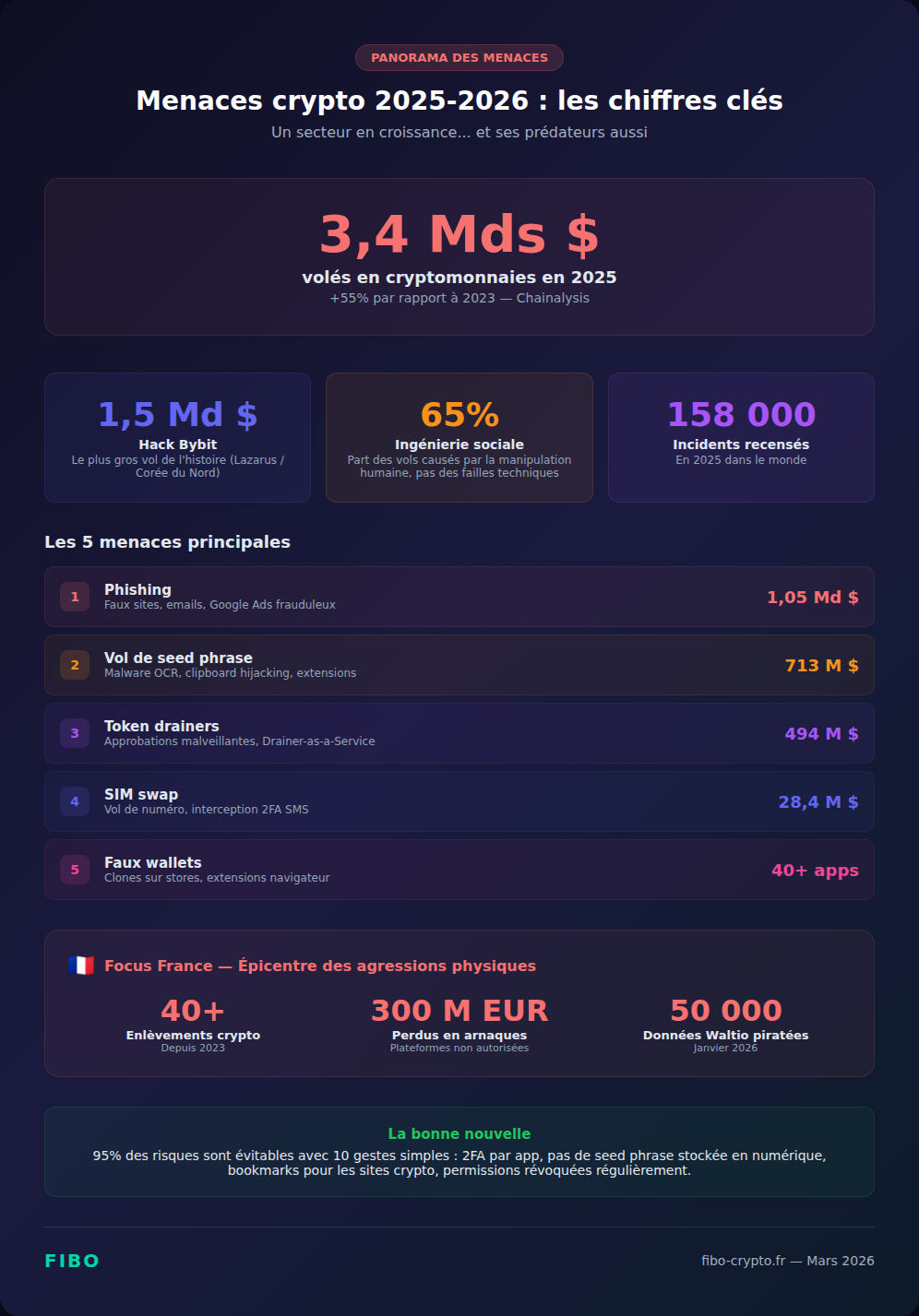
In 2025, hackers stole $3.4 billion in cryptocurrency across 158,000 incidents — a 55% increase from 2023. The majority of these thefts — 65% — didn’t rely on technical exploits, but on social engineering: victims who clicked the wrong link, shared their seed phrase, or approved a transaction they didn’t understand.
The Bybit hack in February 2025 — $1.5 billion siphoned by North Korea’s Lazarus Group — is the largest theft in crypto history. According to Chainalysis, it alone accounted for 44% of the total value stolen that year. And in early 2026, the trend isn’t slowing down: phishing attacks continue to escalate, drainers are getting more sophisticated, and France has become the global epicenter of physical assaults tied to crypto.
2x cheaper fees. Up to 6% yield. No seed phrase. Fibo, the wallet you've been waiting for.
Join the waitlist →This guide isn’t a theoretical cybersecurity course. It’s a practical playbook, broken into concrete steps, so you don’t become a statistic. Whether you hold 500 EUR or 500,000 EUR in crypto, the habits that protect you are the same — and they’re simpler than you think.
The 5 threats you will encounter
Threat #1: Phishing — 49% of losses
Phishing is the number one threat in crypto: it accounts for 49% of losses by value in H1 2025. The concept is simple — a fake site that looks exactly like the real one tricks you into entering your credentials or seed phrase.
In 2024, $1.05 billion was stolen through phishing (CertiK). The “FreeDrain” campaign used 38,000 malicious subdomains mimicking legitimate wallet sites.
The most common variants:
- Fake emails — “Your account has been compromised — verify immediately” with a link to a cloned site
- Fake support on Discord, Telegram, Twitter — “send us your seed phrase to resolve the issue”
- Google Ads placed above real results — you search for “MetaMask,” click an ad that leads to a fraudulent site
- Fake pop-ups — “Update your wallet” that ask for your seed phrase
- Fake airdrops — a message promises free tokens if you “connect your wallet” to an unknown site
The rule: no legitimate crypto company will ever ask for your seed phrase or private key. Ever. For any reason.
Threat #2: Seed phrase theft
Your seed phrase (12 or 24 words) is the master key to your wallet. Whoever has it controls all your funds — permanently and irreversibly. It’s the attack vector that causes the most individual losses in crypto.
How it gets stolen:
- Social engineering — fake support agents asking you to “verify” your phrase
- OCR malware (SparkCat) — apps that scan your phone’s photo gallery looking for screenshots of seed phrases. 242,000+ downloads from official app stores
- Clipboard hijacking (GitVenom) — malware that silently replaces the address you copy with the attacker’s address. 5 BTC (~$485,000) stolen in a single campaign
- Malicious browser extensions — $713 million lost through compromised extensions in 2025
The “free seed phrase” scam: a scammer posts a seed phrase on a forum or social media. You import it, thinking you’ve found a wallet with funds. You send gas to move the tokens — the attacker, who controls the wallet, instantly steals your gas.
Threat #3: SIM swap
A SIM swap is an attack where a criminal transfers your phone number to their own SIM card. They then receive your text messages — including your two-factor authentication codes — and gain access to your crypto accounts.
In 2024, the FBI reported $28.4 million lost to crypto SIM swaps in the US. In the UK, SIM swaps increased by 1,055% between 2023 and 2024. T-Mobile was ordered to pay $33 million after a customer lost their crypto wallet through a SIM swap.
The problem: in 2024, 61% of crypto exchanges still used SMS as the default 2FA method.
The solution: never use SMS for crypto two-factor authentication. Use an authenticator app (Google Authenticator, Authy) or a physical key (YubiKey).
Threat #4: Malicious approvals (token drainers)
Token drainers are malicious smart contracts that exploit DeFi’s approval system. By signing an innocent-looking transaction, you authorize a contract to drain your wallet — sometimes days or weeks later.
When you use a DeFi protocol, you sign an approval that authorizes a smart contract to move your tokens. This is normal and necessary. The problem: malicious sites request an unlimited approval. It looks like a normal transaction. You approve without reading.
In 2024, $494 million was drained from 300,000+ wallets using this method (+67% vs 2023). The largest individual drainer theft: $55.4 million. “Drainer-as-a-Service” kits are sold on the dark web, making the attack accessible to anyone.
The solution: regularly check your active permissions on revoke.cash and revoke any you don’t recognize. Before signing a DeFi transaction, carefully read what you’re approving — especially the amount and the target contract.
Threat #5: Fake wallets
Clones of MetaMask, Phantom, and Trust Wallet circulate on app stores and the Chrome Web Store. Visually identical to the real ones, with fake 5-star reviews, they send your seed phrase to the attacker as soon as you import it.
In April 2025, 40+ malicious Firefox extensions impersonating crypto wallets were discovered. In December 2025, a malicious update to the Trust Wallet Chrome extension drained $7 million from hundreds of accounts.
The rule: only download from the wallet’s official links (on their website), never through a store search.
Where to store your crypto: exchange, hot wallet, or cold wallet?
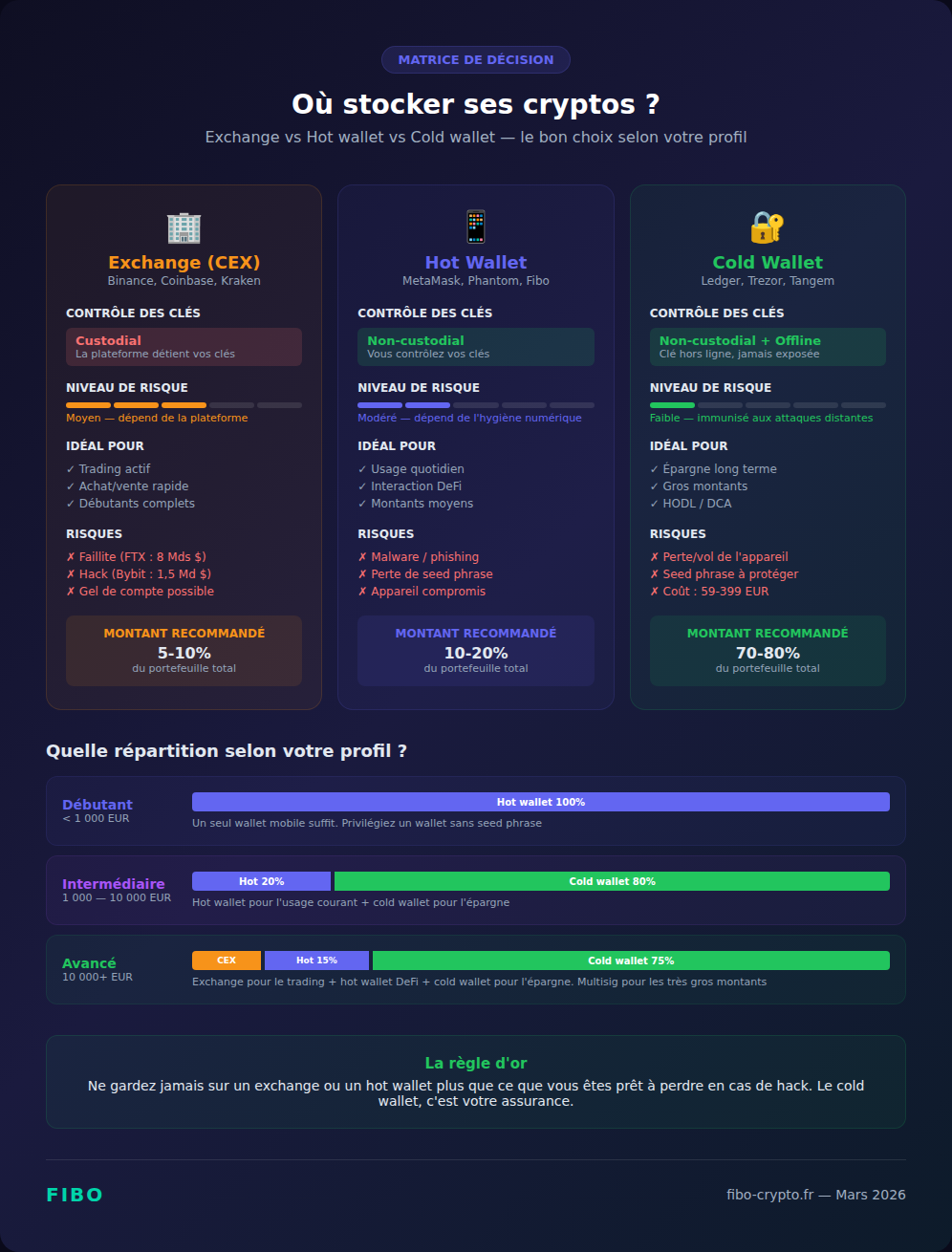
There are three main categories of crypto storage: exchanges (CEX), hot wallets (software), and cold wallets (hardware). The choice depends on your profile: amount held, frequency of use, and technical comfort level. For most investors, the ideal approach is to combine all three.
On an exchange (CEX)
When you buy crypto on Binance, Coinbase, or Kraken, your funds are held by the platform. This is called custodial: the platform holds your private keys. You don’t have a seed phrase, no wallet to manage — but you also don’t have full control.
Advantages:
- Simple — nothing to set up, no seed phrase to back up
- Partial insurance — some exchanges have insurance funds (Binance SAFU: $1B)
- Convenient for active trading — limit orders, stop-loss, instant access
Risks:
- Platform bankruptcy — FTX (2022): $8 billion in customer funds vanished
- Hack — Bybit (2025): $1.5 billion stolen, though customers were reimbursed
- Account freeze — the platform can block your withdrawals (compliance, technical issues, regulatory pressure)
- “Not your keys, not your coins” — you’re trusting a third party to custody your funds
Recommended for: active trading, amounts you’re prepared to use quickly (less than 10-20% of your total crypto portfolio).
Hot wallet (software wallet)
A hot wallet is a mobile app or browser extension that stores your private key on your device. You have full control (self-custody), but your key is connected to the internet — hence the term “hot.”
Examples: MetaMask, Phantom, Trust Wallet, Rabby, Fibo.
Advantages:
- Full control — your keys, your crypto, nobody can freeze your funds
- DeFi access — essential for interacting with decentralized protocols (Aave, Uniswap, etc.)
- Free — no hardware to buy
- Convenient — transactions in seconds from your phone
Risks:
- Vulnerable to malware — if your device is compromised, your key is too
- Seed phrase to protect — if you lose it, you lose everything (unless you use a seedless wallet like Fibo or ZenGo)
- Phishing — a fake site can trick you
Recommended for: daily use, medium amounts, DeFi interaction. Think of it as your digital “pocket wallet.”
Cold wallet (hardware wallet)
A cold wallet is a dedicated physical device (specialized USB key) that generates and stores your private key offline. The key never leaves the device — even when you sign a transaction.
Examples: Ledger Nano S Plus (~79 EUR), Ledger Nano X (~149 EUR), Trezor Safe 3 (~79 EUR), Tangem (~59 EUR).
Advantages:
- Immune to remote attacks — a hacker can’t reach a key that’s never online
- Maximum protection — even if your computer is infected, your funds are safe
- Physical validation — every transaction must be confirmed on the device
Risks:
- Seed phrase to back up — if you lose the device AND the seed phrase, it’s game over
- Cost — 59 to 399 EUR depending on the model
- Less convenient — you need to plug in/connect the device for every transaction
- Physical theft — if someone gets your device and your PIN, they have access (hence the importance of a duress wallet)
Recommended for: long-term savings, significant amounts (over 1,000-2,000 EUR). Think of it as your digital “safe.”
The right allocation for your profile
There’s no one-size-fits-all answer, but here’s an allocation that works for most investors:
- Beginner (under 1,000 EUR): a single secure hot wallet is enough. Choose a seedless wallet (Fibo, ZenGo) to eliminate the risk of loss
- Intermediate (1,000 — 10,000 EUR): hot wallet for daily use (10-20%) + cold wallet for the rest (80-90%)
- Advanced (10,000+ EUR): exchange for active trading (5-10%) + hot wallet for DeFi (10-20%) + cold wallet for savings (70-80%). Consider a multisig for very large amounts
The principle is simple: never keep more on an exchange or hot wallet than you’re willing to lose in a hack. The cold wallet is your insurance.
Security models: which one is right for you?
Not all non-custodial wallets protect your private key the same way. In 2026, five models coexist: the classic seed phrase, MPC, passkeys, TEE + Shamir, and hardware. Choosing the right model depends on your profile and your priorities between simplicity, security, and autonomy.
| Model | How it works | Strengths | Limitations | Examples |
|---|---|---|---|---|
| Seed phrase | 12/24 words to write down on paper | Universal standard, works everywhere | Single point of failure. Lost = funds lost | MetaMask, Ledger, Trezor |
| MPC | Key split between your device and servers | No seed phrase, 0 wallets hacked at ZenGo | Depends on provider’s infrastructure | ZenGo, Fireblocks |
| Passkeys | Face ID / fingerprint. Key in the secure enclave | Phishing-resistant by design | Depends on Apple/Google cloud for sync | Coinbase Smart Wallet |
| TEE + Shamir | Social login, key split inside a secure enclave | Invisible to the user, true self-custody | Depends on Privy’s infrastructure | Fibo (via Privy) |
| Hardware | Dedicated physical device. Key never leaves the device | Immune to remote attacks | $59-399, requires the physical device | Ledger, Trezor, Tangem |
Seed phrase: the legacy model. You write down 12 or 24 words on paper, and those words are the only key to your funds. It’s universal (every wallet supports it), but it’s also a single point of failure: if someone gets your phrase, they get everything. And if you lose it, it’s over. 43.8% of the total value of crypto stolen in 2024 came from compromised seed phrases.
MPC (Multi-Party Computation): your private key is split between your device and the provider’s servers. No single party holds the complete key — not even the provider can access your funds. ZenGo has used this model since 2019 and claims zero wallets hacked. The trade-off: if the provider’s infrastructure goes down, you’ll need to use their recovery plan.
Passkeys: biometric authentication (Face ID, fingerprint) tied to your device’s secure enclave. Passkeys are phishing-resistant by design — they only work on the correct domain. Coinbase Smart Wallet uses them. The limitation: sync depends on Apple iCloud or Google Password Manager.
TEE + Shamir: this is the model used by Privy (75M+ accounts created), which powers wallets like Fibo. You sign in via social login (Gmail, Apple), and your key is split using Shamir’s scheme inside a hardware-secured enclave (TEE). The advantage: it’s invisible to the user, no seed phrase to manage, and it’s true self-custody. The limitation: dependency on Privy’s infrastructure.
Hardware: a dedicated physical device (Ledger, Trezor, Tangem) that generates and stores your key offline. Immune to remote attacks by design. Ideal for long-term savings. But it still has a seed phrase — which brings back the backup problem.
The common thread across all seed phrase alternatives (MPC, passkeys, TEE): they eliminate attack vector #1 — seed phrase theft, which accounted for 43.8% of the total value of crypto stolen in 2024.
The security checklist — the 10 habits that matter
Crypto security isn’t about sophisticated tools. It’s 10 simple habits, applied consistently, that protect against 95% of risks. Here’s the concrete checklist to follow.
Google Authenticator or Authy. SMS is vulnerable to SIM swap ($28.4M lost in 2024)
No legitimate company will ever ask for it. Not by email, not by chat, not by phone. Never
Never click on an email link or a Google ad. Type the URL manually or use your bookmarks
Check your approvals on revoke.cash. Revoke any you don’t recognize ($494M drained in 2024)
Hot wallet = pocket wallet. Cold wallet (Ledger, Trezor) = safe. Keep them separate
40+ fake browser extensions discovered in 2025. Use the direct link from the wallet’s website
A separate browser profile with minimal extensions. $713M lost through compromised extensions in 2025
Fake support agents on Discord/Telegram ask for screen sharing to see your keys. No real support does this
Send a small amount ($5) first to verify the address and network are correct. Crypto transactions are irreversible
40+ crypto kidnappings in France since 2023. Use pseudonyms online, no portfolio screenshots on social media
Securing your crypto step by step — the beginner’s guide
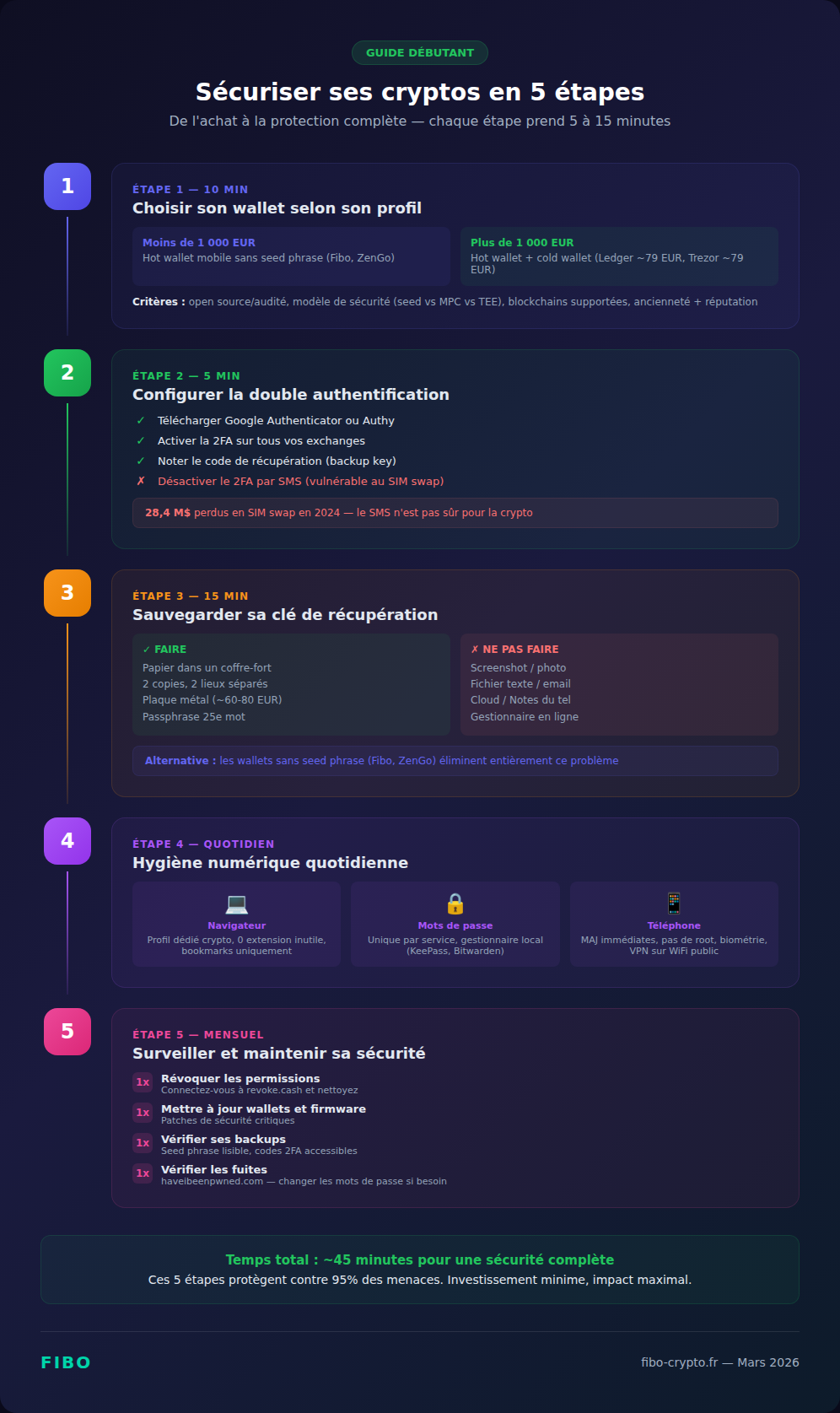
You just bought your first crypto and don’t know where to start with security? This 5-step guide covers everything you need to set up, from choosing a wallet to maintaining your security over time. Follow it in order — each step takes between 5 and 15 minutes.
Step 1 — Choose your wallet based on your profile
First things first, define your profile:
- I’m a beginner, I have less than 500 EUR: a mobile hot wallet is enough. Choose a seedless wallet (Fibo, ZenGo) — less risk of loss, smoother experience
- I have between 500 and 5,000 EUR: hot wallet for daily use + consider a cold wallet (Ledger Nano S Plus at ~79 EUR) for the savings portion
- I have more than 5,000 EUR: cold wallet is a must for the bulk of your portfolio. Hot wallet only for amounts you actively use
Criteria for choosing a hot wallet:
- Open source or audited by third parties?
- Seed phrase or alternative model (MPC, passkeys, TEE)?
- Supports the blockchains you use?
- Reviews and reputation — check Reddit, Twitter, crypto forums
- Track record — be wary of wallets launched less than 6 months ago
Step 2 — Set up two-factor authentication
2FA (two-factor authentication) is your second line of defense. Set it up everywhere: exchanges, email, social media accounts linked to crypto.
How to set up app-based 2FA (5 minutes):
- Download Google Authenticator (or Authy if you want multi-device sync) from the official store
- On your exchange (Binance, Coinbase, Kraken), go to Settings, then Security, then Two-Factor Authentication
- Scan the QR code shown with the authenticator app
- Write down the recovery code (backup key) — if you lose your phone, this is the only way to restore access
- Enter the 6-digit code generated by the app to confirm
- Disable SMS-based 2FA if it’s still active — SMS is not secure
Going further: if you hold more than 10,000 EUR in crypto, consider a physical YubiKey (~55 EUR). It’s immune to phishing — unlike a code you might enter on a fake site, the YubiKey verifies the domain automatically.
Step 3 — Back up your recovery key properly
If your wallet uses a seed phrase, the backup is the most important decision you’ll make. Phrase lost = funds lost. Phrase stolen = funds stolen.
The backup rules:
- Paper, never digital — no screenshots, no text files, no email to yourself, not in your phone’s notes. The SparkCat malware scans photo galleries (242,000+ downloads)
- Two copies minimum — stored in two different physical locations (home safe + bank deposit box, for example)
- Fire and water resistant — plain paper can be destroyed. Metal plates (Billfodl, Cryptosteel, ~60-80 EUR) withstand fire up to 1,500 degrees Celsius and water
- Optional passphrase (25th word) — Ledger and Trezor wallets let you add an extra password to your seed phrase. Even if someone finds your 24 words, without the 25th they can’t access the right wallet
What you should NEVER do:
- Store the seed phrase in an online password manager (LastPass was hacked in 2022)
- Take a photo of it
- Send it by email or messaging
- Type it on any website (regardless of what it claims to be)
- Give it to anyone, even “technical support”
Alternative: choosing a seedless wallet (Fibo, ZenGo, Coinbase Smart Wallet) eliminates this problem entirely. No phrase to write down = no phrase to lose or get stolen.
Step 4 — Daily digital hygiene
Crypto security doesn’t end at the initial setup. It’s a set of daily habits:
Browser:
- Create a dedicated browser profile for crypto (Chrome, Brave, or Firefox all support multiple profiles). Zero extensions except your wallet
- Bookmark all your crypto sites — never use Google to access an exchange or DeFi protocol
- Check the URL letter by letter before connecting your wallet (scammers use domains like “metamask.io” vs “rnetamask.io”)
Passwords:
- A unique password for every crypto service — never the same as your email or social media
- Use a local password manager (KeePass, Bitwarden) — not an Excel file or a sticky note
- Your main crypto email must have a strong password + 2FA. If your email is compromised, everything is
Phone:
- Updates — install iOS/Android updates as soon as they’re available. They patch actively exploited security vulnerabilities
- No root/jailbreak — a rooted phone is a phone open to malware
- Biometric lock — enable Face ID or fingerprint on your phone AND on your wallet app
- Be cautious with public WiFi — if you must use a public network, enable a VPN
Step 5 — Monitor and maintain your security
Crypto security is an ongoing process, not a one-time action. Schedule a monthly “security audit”:
- Revoke permissions — connect to revoke.cash once a month and revoke approvals you don’t recognize or no longer need
- Wallet updates — verify that your wallet (software or hardware) is up to date. Updates patch vulnerabilities
- Check your backups — is your seed phrase still legible? Still in its secure location? Are your 2FA recovery codes accessible?
- Monitor your addresses — set up alerts on Etherscan or DeBank to be notified of any outgoing transaction on your wallets
- Check for data breaches — enter your email at haveibeenpwned.com. If a breach involves a crypto service, change your passwords immediately
Security in France: kidnappings, scams, and country-specific risks
France leads the world in physical assaults tied to cryptocurrency, with over 40 kidnappings since 2023. On top of that, there are specifically French scams: fake tax authority SMS messages, platforms not registered with France’s financial markets authority (AMF), and exploitation of data breaches. This section isn’t alarmist — it’s factual.
The Ledger case (January 2025)
David Balland, co-founder of Ledger, and his wife were kidnapped in Vierzon, France. The kidnappers severed his finger and sent the video to demand a 10 million EUR ransom in crypto. France’s elite GIGN unit freed him after 48 hours. 10 arrests were made.
Since July 2023, over 40 crypto kidnappings have occurred in France. 19 attacks in 2025 alone — more than any other country in the world (the US had 8). CertiK reported 72 physical attacks (“wrench attacks”) worldwide in 2025, up 75%.
What’s fueling these attacks
- Data breaches — in June 2025, an employee at the French tax authority (DGFIP) was caught providing crypto investor data to criminals
- Waltio hack (January 2026) — the personal data of 50,000 users of the French crypto tax reporting service (emails, tax reports, gain/loss amounts) leaked on the dark web. The hackers explicitly claimed a connection to the kidnappings
- Social media — displaying your gains, NFTs, or crypto balances is an invitation to become a target
How to protect yourself from physical attacks
- Use pseudonyms systematically in crypto communities
- Never display your amounts, your gains, your hardware purchases (Ledger, etc.)
- Don’t share your real-time location on social media
- Consider a “duress wallet” (decoy wallet with a small balance) if you hold significant amounts — under physical coercion, you hand over the decoy
- Report any threats to law enforcement immediately — French police have specialized units (OCLTIC, C3N)
- Consider a multisig for large amounts — even under duress, you can’t transfer alone
France-specific scams (tax SMS, AMF)
The fake tax SMS: an active scam in 2025-2026. An SMS impersonating the French tax authority (DGFIP) announces “Crypto transactions have been detected on your accounts. Report them to avoid a 40% penalty.” The link leads to a fraudulent site (e.g., “-gouv-fr.com”).
How to spot the fake:
- Legitimate French government sites ALWAYS end in .gouv.fr (not “.gouv-fr.com”)
- The DGFIP exclusively uses email addresses ending in @dgfip.finances.gouv.fr
- The tax authority NEVER requests personal data via SMS
The AMF blacklist: France’s financial markets authority (AMF) regularly updates its list of fraudulent platforms. In 2025, 71 names were added. French victims lost a total of 300 million EUR on unauthorized platforms.
Before using any platform: check that it’s not on the AMF blacklist, and that it’s properly registered as a PSAN (France’s crypto service provider registration) or licensed under MiCA. In France, only platforms registered with the AMF as PSAN (Prestataire de Services sur Actifs Numeriques) are legally authorized to operate.
The 7 fatal mistakes to avoid
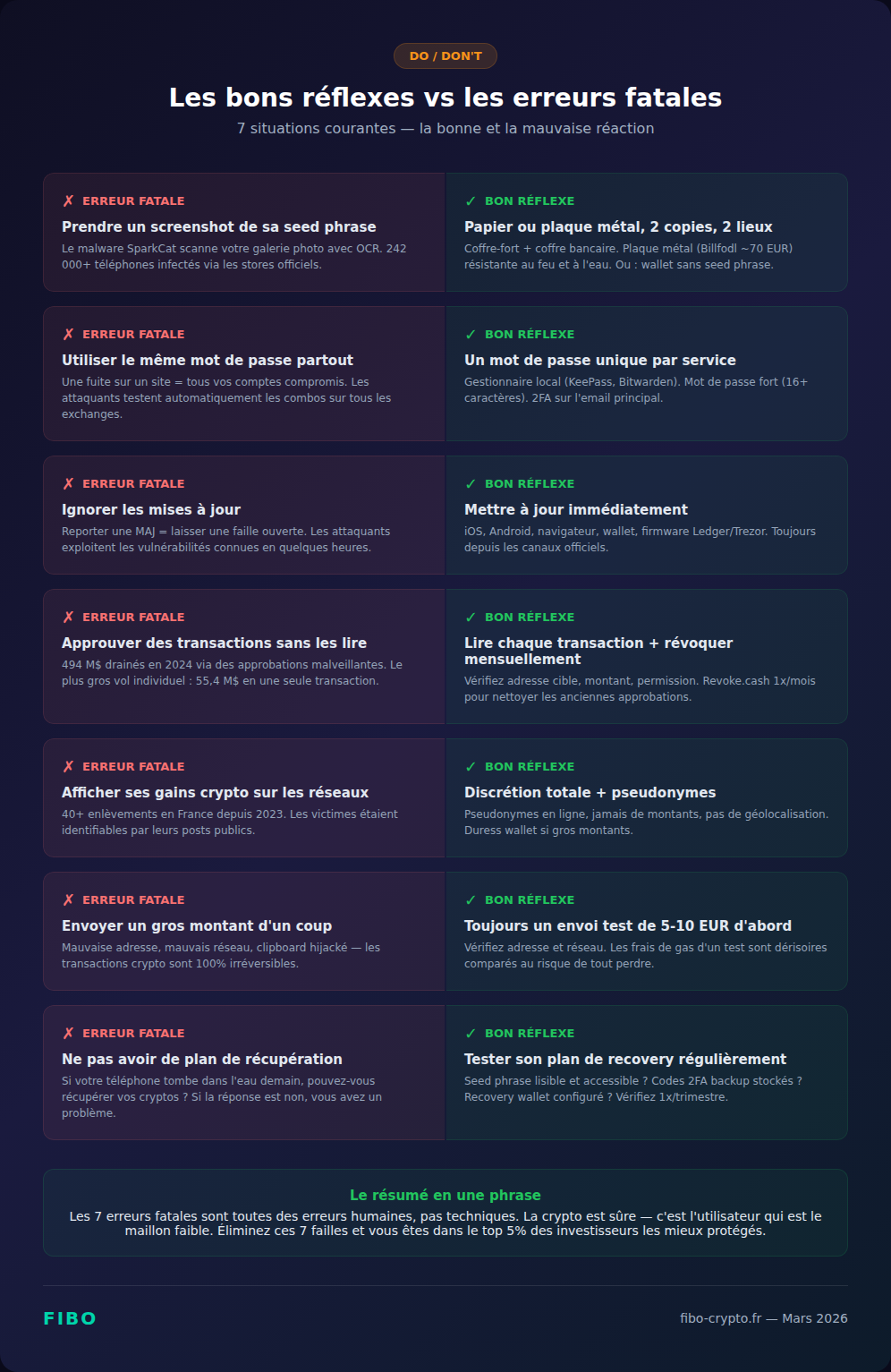
These mistakes cost investors millions every year. They’re all avoidable. Here are the 7 most common blunders and how to not make them.
Mistake #1: Screenshotting your seed phrase. The SparkCat malware infected 242,000+ phones through legitimate apps on the Play Store and App Store. It scans your photo gallery using text recognition (OCR) and sends detected seed phrases to the attacker. Never a photo, never a screenshot. Paper or metal only.
Mistake #2: Reusing the same password everywhere. If your password leaks from one site (and breaches are frequent — check at haveibeenpwned.com), the attacker automatically tries that password on every exchange and wallet. One unique password per service, stored in a password manager.
Mistake #3: Ignoring updates. Your phone, browser, and wallet updates patch actively exploited security vulnerabilities. Postponing an update by 2 weeks means leaving a door open for 2 weeks. Update as soon as possible — always from official channels.
Mistake #4: Approving transactions without reading them. Token drainers rely on your haste. When MetaMask or your wallet displays a transaction summary, read it. Check: to which address? What amount? What permission? If you don’t understand what you’re signing, don’t sign.
Mistake #5: Flaunting your crypto wealth on social media. 40+ kidnappings in France since 2023. Victims were often identifiable through their social media posts — portfolio screenshots, photos with crypto hardware, gain discussions in public groups. Discretion is a security measure.
Mistake #6: Sending a large amount without a test transaction. Crypto transactions are irreversible. A wrong address (one extra letter, wrong network) and your funds are permanently lost. Always send a small test amount (5-10 EUR) first. The gas fees for a test transaction are negligible compared to the risk.
Mistake #7: Not having a recovery plan. If your phone falls in water tomorrow, can you recover access to your crypto? If the answer is no, you have a problem. Test your recovery plan: is your seed phrase legible and accessible? Are your 2FA backup codes stored? Does your seedless wallet have a recovery mechanism configured?
Emergency: what to do if…
If your crypto security is compromised, every second counts. Here are emergency protocols for the three most common scenarios. Act first, analyze later.
Your wallet has been compromised
Act immediately — every second counts:
- Create a new wallet on a clean device (or a fresh browser profile)
- Transfer your remaining funds to the new wallet as fast as possible
- Revoke all permissions on the compromised wallet (revoke.cash)
- Disconnect all apps connected to the compromised wallet
- Run a full antimalware scan on all your devices
- Never reuse the compromised wallet or its seed phrase
If funds were stolen, keep all evidence (addresses, transaction hashes, screenshots). File a report with law enforcement — specialized units can trace funds on-chain. In France, the OCLTIC handles crypto-related cases.
You clicked on a suspicious link
- Close the tab immediately
- If you didn’t sign anything or enter anything: run an antimalware scan as a precaution
- If you signed a transaction or entered your seed phrase: follow the “compromised wallet” protocol above
- Check and revoke your permissions on revoke.cash
- Change the passwords of accounts you recently used on that device
Your seed phrase is lost
If you still have access to the wallet on a device:
- Create a new wallet immediately
- Write down the new seed phrase properly (paper, two copies, separate locations)
- Transfer all your funds to the new wallet
If you’ve lost all access (device lost + seed phrase lost): the funds are permanently lost. There is no “forgot my password” in crypto. This is exactly why seedless wallets (Fibo, ZenGo, Coinbase Smart Wallet) exist — recovery happens via social login or passkey, not words on a piece of paper.
The future of crypto security
The seed phrase is in decline. The crypto industry is converging on security models that offer self-custody without the human risk: social recovery, widespread passkeys, and institutionalized MPC. By 2027-2028, writing 24 words on paper will likely be the exception, not the norm.
- Social recovery (proposed by Vitalik Buterin) — trusted “guardians” can help you recover access to your wallet if you lose your key. Ethereum’s Pectra upgrade (EIP-7702) lays the groundwork by allowing classic wallets to function as smart accounts, paving the way for native social recovery
- Widespread passkeys — Apple, Google, and Microsoft are pushing passkeys as the replacement for passwords. Crypto wallets are following suit (Coinbase Smart Wallet, Phantom). Adoption is exploding: over one billion passkeys created by the end of 2025
- Institutionalized MPC — solutions like Privy (75M+ accounts created) and Fireblocks are becoming the standard for new wallets. The advantage: institutional-grade security, accessible to the general public
- Account abstraction — ERC-4337 and smart accounts enable programmable security rules: daily spending limits, address whitelists, confirmation delays for large amounts. Security becomes configurable, not binary
- AI-powered threat detection — tools like Wallet Guard and Pocket Universe analyze transactions before signing and alert you to risks. In 2026, this layer of protection is becoming standard in modern wallets
The trend is clear: crypto security is evolving from a model where “everything rests on the user” to one where “the infrastructure protects the user.” The best security isn’t the one that demands the most effort from you. It’s the one that eliminates the point of failure without sacrificing your control over your funds.
📚 Glossary
- Phishing : A scam technique involving creating a fake site or email that mimics a legitimate service, to steal your credentials or seed phrase. Accounts for 49% of losses by value in H1 2025.
- Seed phrase : A sequence of 12 or 24 words that represents your private key. Whoever has it controls all your funds — permanently and irreversibly.
- SIM swap : An attack where a criminal transfers your phone number to their own SIM card, to receive your SMS messages and verification codes. Up 1,055% in the UK between 2023 and 2024.
- Token drainer : A malicious smart contract that, once approved by the user, can automatically drain all tokens from the wallet. $494 million drained from 300,000+ wallets in 2024.
- 2FA (Two-factor authentication) : An additional security layer on top of your password. Use an app (Google Authenticator, Authy) or a physical key (YubiKey) — never SMS.
- Revoke : Canceling a permission previously granted to a smart contract. An essential maintenance step to perform regularly via revoke.cash.
- TEE (Trusted Execution Environment) : A secure enclave within a processor, isolated from the operating system. Used to generate and protect private keys without ever exposing them.
- MPC (Multi-Party Computation) : Technology that splits the private key across multiple parties. No single party holds the complete key, eliminating the single point of failure.
- Cold wallet : An offline wallet (Ledger, Trezor, Tangem). The private key never leaves the physical device. Immune to remote attacks, recommended for large amounts.
- Hot wallet : A software wallet connected to the internet (MetaMask, Phantom, Fibo). Convenient for daily use and DeFi, but more exposed to online threats than a cold wallet.
- Passkey : Biometric authentication (Face ID, fingerprint) tied to a device’s secure enclave. Phishing-resistant by design because it verifies the domain automatically.
- Wrench attack : A physical assault aimed at forcing the victim to transfer their crypto under duress. Sharply increasing in France with 40+ cases since 2023.
- PSAN : Prestataire de Services sur Actifs Numeriques (Digital Asset Service Provider). Mandatory registration with France’s financial markets authority (AMF) to legally operate in France. Being progressively replaced by the European MiCA license.
- Custodial / Non-custodial : A custodial wallet (exchange) entrusts your keys to a third party. A non-custodial wallet (MetaMask, Ledger, Fibo) gives you exclusive control over your private keys.
- Multisig : A wallet that requires multiple signatures (e.g., 2 out of 3) to validate a transaction. Protects against theft by a single attacker and against physical coercion.
- Account abstraction : An Ethereum technology (ERC-4337) that turns wallets into programmable smart contracts. Enables advanced features: spending limits, social recovery, address whitelists.
- Duress wallet : A decoy wallet containing a small balance, designed to be handed over under physical coercion (kidnapping, assault). The real portfolio remains hidden.
- Shamir’s Secret Sharing : A cryptographic algorithm that divides a secret (private key) into multiple fragments. A minimum number of fragments is needed to reconstruct the secret — a single fragment is useless.
Frequently Asked Questions
What is the biggest risk in crypto?
Phishing (fake sites and emails) accounts for 49% of losses by value in H1 2025. But the most devastating threat is seed phrase theft — whoever has your 12 words controls everything, permanently and irreversibly. Seedless wallets (Fibo, ZenGo, Coinbase Smart Wallet) eliminate this risk.
Is SMS-based 2FA sufficient?
No. The FBI and CISA officially advised against SMS-based 2FA in 2024 following the Salt Typhoon attacks. SMS is vulnerable to SIM swap ($28.4M lost in 2024 in the US, +1,055% in the UK). Use an authenticator app (Google Authenticator, Authy) or a physical key (YubiKey).
How do I verify that a crypto site is legitimate?
Type the URL manually (never click on an email link or an ad). Check for the HTTPS padlock. Verify the domain name letter by letter (scammers use look-alikes like “rnetamask.io” instead of “metamask.io”). Bookmark the sites you use regularly. And in France, check the AMF blacklist before using any new platform.
What should I do if someone asks for my seed phrase?
Don’t give it out. Ever. For any reason. No legitimate crypto company — MetaMask, Binance, Coinbase, Ledger, Fibo — will ever ask for your seed phrase. If someone asks, it’s a scam. 100%. Block them and report the account.
How do I secure my seed phrase?
Write it on paper (never digitally — no screenshots, no Notes app, no email). Store it in a safe place, ideally fire and water resistant: a safe or a metal plate (Billfodl, Cryptosteel, ~60-80 EUR). Make two copies in two separate locations. Or better yet: choose a seedless wallet.
Do I need a hardware wallet to secure my crypto?
If you hold more than 1,000-2,000 EUR in crypto: yes, strongly recommended for long-term storage. A Ledger Nano S Plus costs ~79 EUR, a Trezor Safe 3 the same. If you’re starting out with small amounts, a secure mobile wallet (seedless if possible) is sufficient. The ideal setup: hot wallet for daily use, cold wallet for savings.
Are crypto kidnappings in France really common?
It’s a real and rapidly growing phenomenon: 40+ cases since 2023, including the kidnapping of Ledger’s co-founder in January 2025 (finger severed, 10M EUR ransom). France accounts for approximately 80% of physical crypto assaults in Europe. Victims are often identifiable through social media. Protection: pseudonyms, absolute discretion, never display your holdings.
What's the difference between a hot wallet and a cold wallet?
A hot wallet (MetaMask, Phantom, Fibo) is software connected to the internet — convenient for daily use and DeFi, but exposed to online attacks. A cold wallet (Ledger, Trezor) is a physical device that stores your key offline — immune to hackers, but less convenient. The ideal approach is to combine both: hot wallet for small active amounts, cold wallet for savings.
How do I revoke my wallet's permissions?
Connect to revoke.cash with your wallet. The site displays all approvals (permissions) you’ve granted to smart contracts. Identify those you don’t recognize or no longer need, and click “Revoke.” It costs a small gas fee. Do this at least once a month — it’s an essential maintenance step.
What is a seedless wallet and is it secure?
A seedless wallet uses alternative technologies to protect your private key: MPC (ZenGo), passkeys (Coinbase Smart Wallet), or TEE + Shamir (Fibo via Privy). You don’t have 12/24 words to write down — you sign in via social login, biometrics, or passkey. It’s equally secure (or more so, since the main attack vector — seed phrase theft — is eliminated). ZenGo claims 0 wallets hacked since 2019.
📰 Sources
This article is based on the following sources:
- Chainalysis — 2025 Crypto Crime Report
- FBI IC3 — Bybit Hack Attribution
- CertiK — Phishing Losses 2024
- Scam Sniffer — Wallet Drainer Report 2024
- AMLBot — Crypto Crime Report 2025
- Crypto.news — France 40+ Kidnappings
- Fortune — Ledger Co-Founder Kidnapping
- CyberNews — Waltio Data Breach
- Deepstrike — SIM Swap Statistics 2025
- AMF — Crypto asset blacklist
- SentinelOne — SparkCat Malware Analysis
- Kaspersky — GitVenom Campaign
Comment citer cet article : Fibo Crypto. (2026). How to secure your crypto — The no-jargon guide (2026). Consulté le 21 July 2026 sur https://fibo-crypto.fr/en/blog/how-to-secure-your-crypto-guide/
The simplest way to buy, swap and manage your crypto
Join the first users and get priority access. No seed phrase, fees 3.5x lower, built-in DeFi yield.
Join the waitlist →