Crypto Wallet for Beginners: The Complete Guide to Understand and Choose (2026)
📋 En bref (TL;DR)
- A crypto wallet doesn’t store your crypto — it stores your private keys that grant access to your funds on the blockchain.
- Two main types: custodial (the exchange holds your keys) vs non-custodial (you hold them) — the difference is fundamental.
- Hot wallet (connected to the Internet) vs cold wallet (offline): the choice depends on your usage and the amount you need to secure.
- The seed phrase (12-24 words) is your only traditional backup — never store it digitally, never as a photo, never in the cloud.
- Seedless wallets exist in 2026 (Privy, passkeys, MPC) and radically simplify the experience without sacrificing security.
- 5 criteria to choose: security, supported blockchains, fees, ease of use, reputation.
- The 5 most costly beginner mistakes are avoidable with the right security practices.
- A non-custodial wallet is recommended to keep control of your funds — “not your keys, not your coins”.
- For beginners: a non-custodial multi-chain mobile wallet is the best choice in terms of simplicity-to-security ratio.
- Setup takes less than 5 minutes — and this guide walks you through it step by step.
What is a crypto wallet? (The real answer)
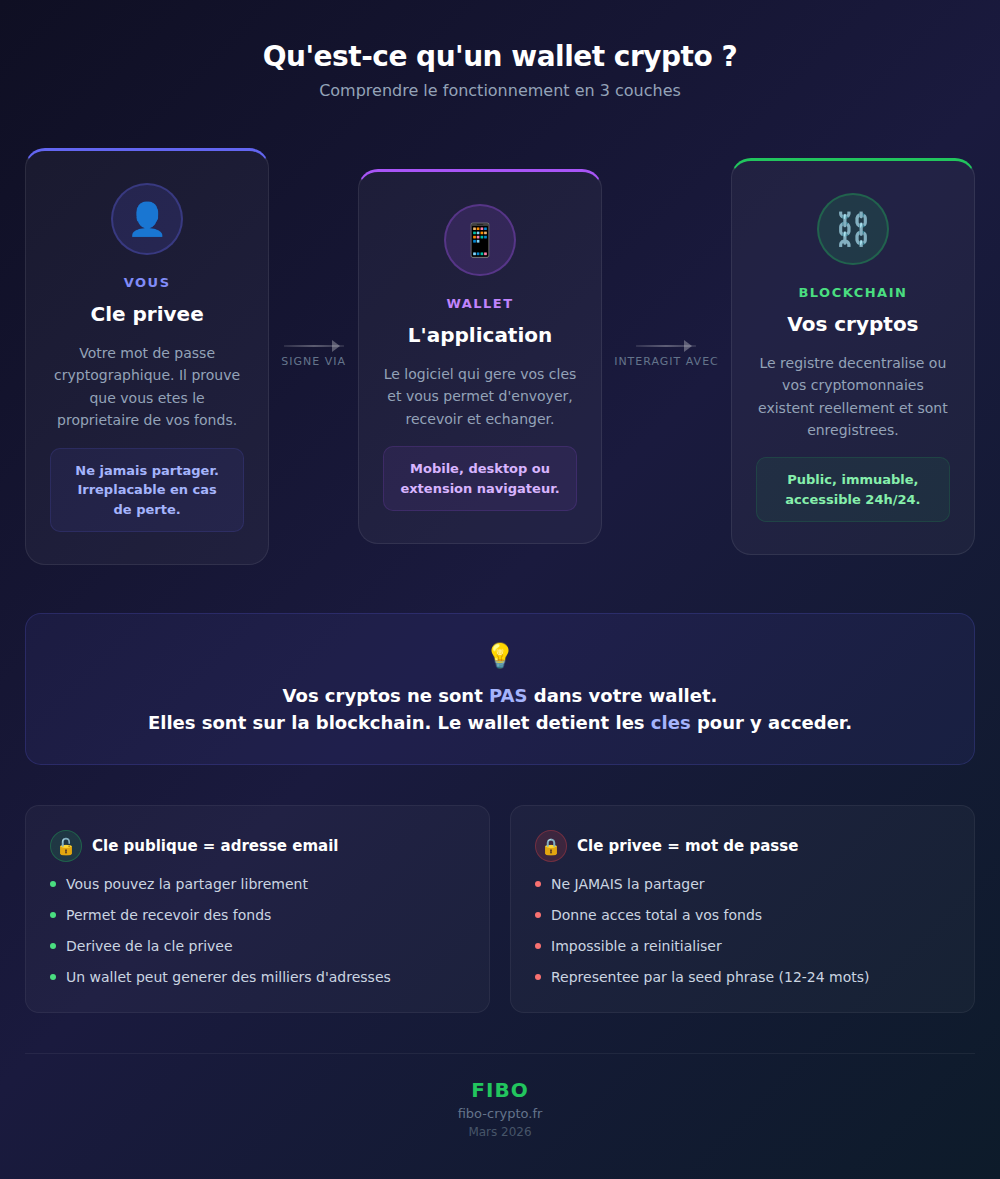
A crypto wallet is a piece of software or a device that stores your private keys — the cryptographic codes that prove you own your funds on the blockchain. Despite what the name suggests, a wallet doesn’t actually “contain” your cryptocurrencies. Your crypto lives on the blockchain. The wallet simply holds the keys that allow you to access and move it.
This is a crucial distinction that most beginners don’t understand. When you “send bitcoin,” you’re not physically transferring anything. You’re signing a transaction with your private key to authorize a change of record on the blockchain. Your wallet is the tool that performs this signature.
More than 820 million wallets exist worldwide in 2026 (source: CoinGecko). In one year, this number grew by 34%. Adoption is accelerating, driven by mobile wallets and simplified experiences.
Public key vs private key — the safe analogy
Your wallet manages two types of cryptographic keys:
The public key works like an email address. You can share it freely. It’s what allows anyone to send you cryptocurrency. Technically, it’s an identifier mathematically derived from your private key.
The private key works like your email password — except it’s irreplaceable. If you lose it, no one can reset it. If someone finds it, they have access to all your funds. There is no “forgot password” button on the blockchain.
The most accurate analogy: imagine a transparent safe in a public room. Everyone can see what’s inside (the blockchain is public) and everyone can deposit something into it (using your public key). But only your private key opens the safe to withdraw its contents.
Address vs wallet: the essential distinction
A common confusion among beginners: mixing up “address” and “wallet.” A wallet can generate thousands of different addresses, all controlled by the same private key. Each address is a unique receiving point, mathematically derived from your public key.
In practice, it’s as if your mailbox had several entry slots — each with a different label — but only one key to open the whole thing. Some wallets automatically generate a new address for each incoming transaction (this is the case with Bitcoin), which improves privacy.
The key takeaway: your wallet = your keys. Your addresses = the public identifiers that allow you to receive funds. The blockchain = where your crypto actually exists.
Types of wallets: understand before you choose
There are 4 main categories of wallets, organized along two axes: Internet connectivity (hot vs cold) and key control (custodial vs non-custodial). Understanding these distinctions is the first step toward making an informed choice.
Hot wallet vs Cold wallet
A hot wallet is permanently connected to the Internet. This includes mobile apps (MetaMask, Trust Wallet, Fibo), browser extensions (MetaMask, Rabby), and desktop wallets (Exodus, Electrum). The advantage: easy access and speed for everyday transactions. The downside: exposure to online attacks (phishing, malware, software vulnerabilities).
A cold wallet is disconnected from the Internet. The most well-known type is the hardware wallet (Ledger, Trezor) — a physical device that stores your private keys offline. There’s also the paper wallet (your keys printed on paper), though this method is increasingly less recommended. The advantage: maximum security against online attacks. The downside: less convenient for frequent transactions.
| Criterion | Hot wallet | Cold wallet |
|---|---|---|
| Connection | Always online | Offline |
| Security | Moderate | Maximum |
| Convenience | Very practical | Less practical |
| Cost | Free | $50-200 |
| Ideal for | Daily use, small amounts | Long-term storage, large amounts |
| Examples | MetaMask, Fibo, Trust Wallet | Ledger, Trezor, Tangem |
Most experienced users use both: a hot wallet for everyday transactions (like a checking account) and a cold wallet for long-term storage (like a safe).
Custodial vs Non-custodial — the fundamental question
This is the most important distinction to understand before choosing a wallet.
A custodial wallet is a wallet where a third party (usually an exchange like Binance, Coinbase, or Kraken) holds your private keys on your behalf. You have an “account” with a username and password, but you don’t have access to your keys. It’s like having a safe deposit box at the bank: convenient, but the bank has the keys.
A non-custodial wallet is a wallet where you alone hold your private keys. The software provider (MetaMask, Phantom, Fibo) has no access to your funds. They can’t move them, freeze them, or seize them. It’s your personal safe — no one else has the key.
The founding principle of crypto is crystallized in one phrase: “Not your keys, not your coins.” If you don’t hold your private keys, you don’t truly own your cryptocurrency. The collapses of FTX (2022 — $8 billion in customer funds vanished), Celsius, and BlockFi proved this brutally: millions of users lost their funds because they trusted a custodial intermediary.
| Criterion | Custodial | Non-custodial |
|---|---|---|
| Who holds the keys | The exchange (Binance, Coinbase) | You alone |
| Bankruptcy risk | Yes (FTX, Celsius) | No |
| Recovery | Email + password | Seed phrase or passkey |
| Censorship possible | Yes (account freeze) | No |
| Ease of use | Very simple | Varies (depends on the wallet) |
| Examples | Binance, Coinbase, Kraken | MetaMask, Phantom, Fibo |
Mobile, desktop, or browser extension?
Beyond the hot/cold and custodial/non-custodial classifications, wallets also differ by format:
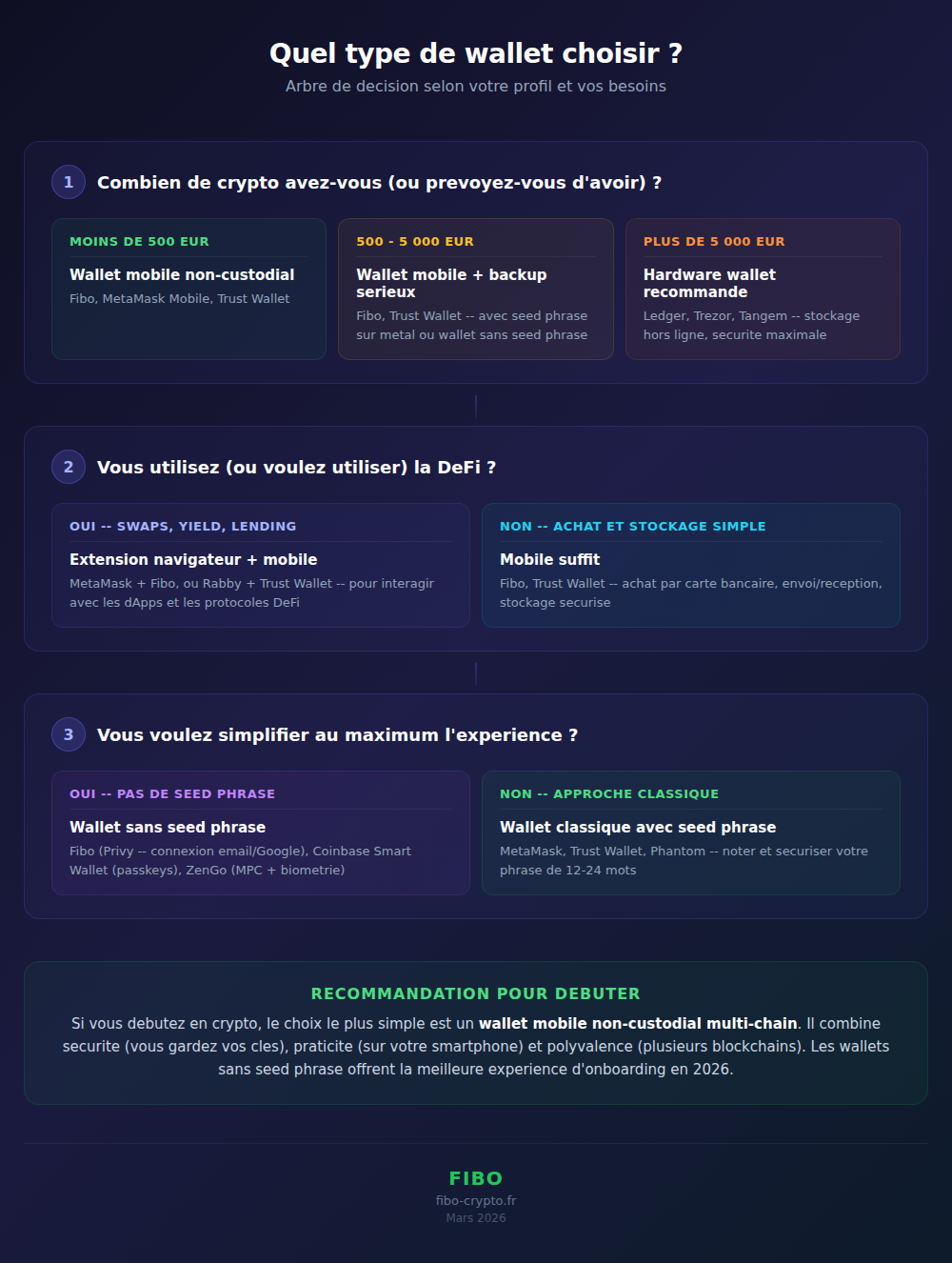
Mobile wallet (iOS/Android app): this is the most practical format for daily use. You always have it in your pocket, with biometric access (fingerprint, Face ID). It’s the recommended format for beginners. Examples: Fibo, Trust Wallet, MetaMask Mobile, Phantom.
Desktop wallet (Windows/Mac/Linux application): suited for users managing large amounts who prefer a bigger screen. Often used alongside a hardware wallet. Examples: Exodus, Electrum, Ledger Live.
Browser extension (Chrome, Firefox, Brave): essential for interacting with dApps and DeFi. The extension connects directly to Web3 sites. Examples: MetaMask, Rabby, Phantom.
For a beginner, the recommendation is clear: start with a non-custodial multi-chain mobile wallet. It’s the best compromise between security, convenience, and versatility.
The seed phrase: your backup key (and your biggest responsibility)
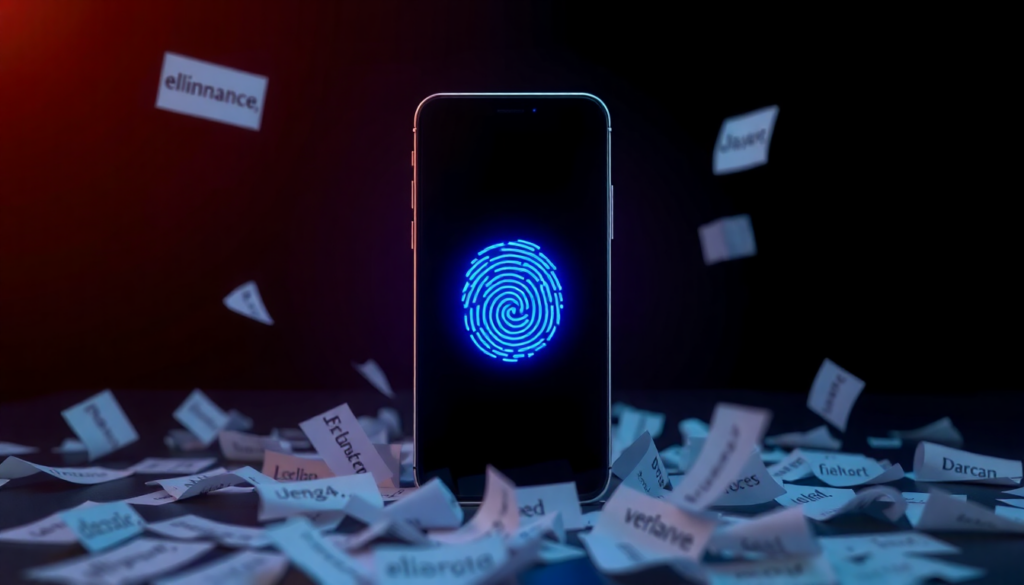
The seed phrase (or recovery phrase) is a randomly generated sequence of 12 or 24 words that allows you to restore access to your wallet on any compatible device. It’s the backup standard used by virtually all traditional non-custodial wallets, defined by the BIP-39 protocol.
Concretely, these 12 or 24 words represent your private key in a human-readable form. From this sequence, the wallet can derive all of your private keys, public keys, and addresses. Losing your phone is not a problem if you have your seed phrase. Losing your seed phrase is catastrophic, even if your phone still works.
According to Chainalysis, 3.79 million Bitcoin are lost forever — over $120 billion — primarily due to seed phrases that were lost, forgotten, or destroyed. That’s 20% of all bitcoin ever mined.
The golden rules of the seed phrase:
- Never as a photo — your photo gallery may be synced to the cloud without you knowing
- Never online — not in a text file, not in an email, not in a password manager
- Physical medium — paper (at minimum), metal plate (ideal for resisting fire and water)
- Safe and separate location — not in the same drawer as your phone, ideally in a safe or with a trusted person
- Test the backup — verify that you can restore your wallet with your seed phrase BEFORE depositing significant funds
Seedless wallets: the new generation. In 2026, technologies like Privy (TEE + Shamir), passkeys (WebAuthn/FIDO2), and MPC (Multi-Party Computation) make it possible to create non-custodial wallets without ever seeing or writing down a seed phrase. Your private key is fragmented, stored in secure enclaves, and reassembled only at the moment of signing a transaction. You log in with your email, Google, or Apple — just like any fintech app. This is the model used by Fibo.
How to choose your first wallet: the 5 essential criteria
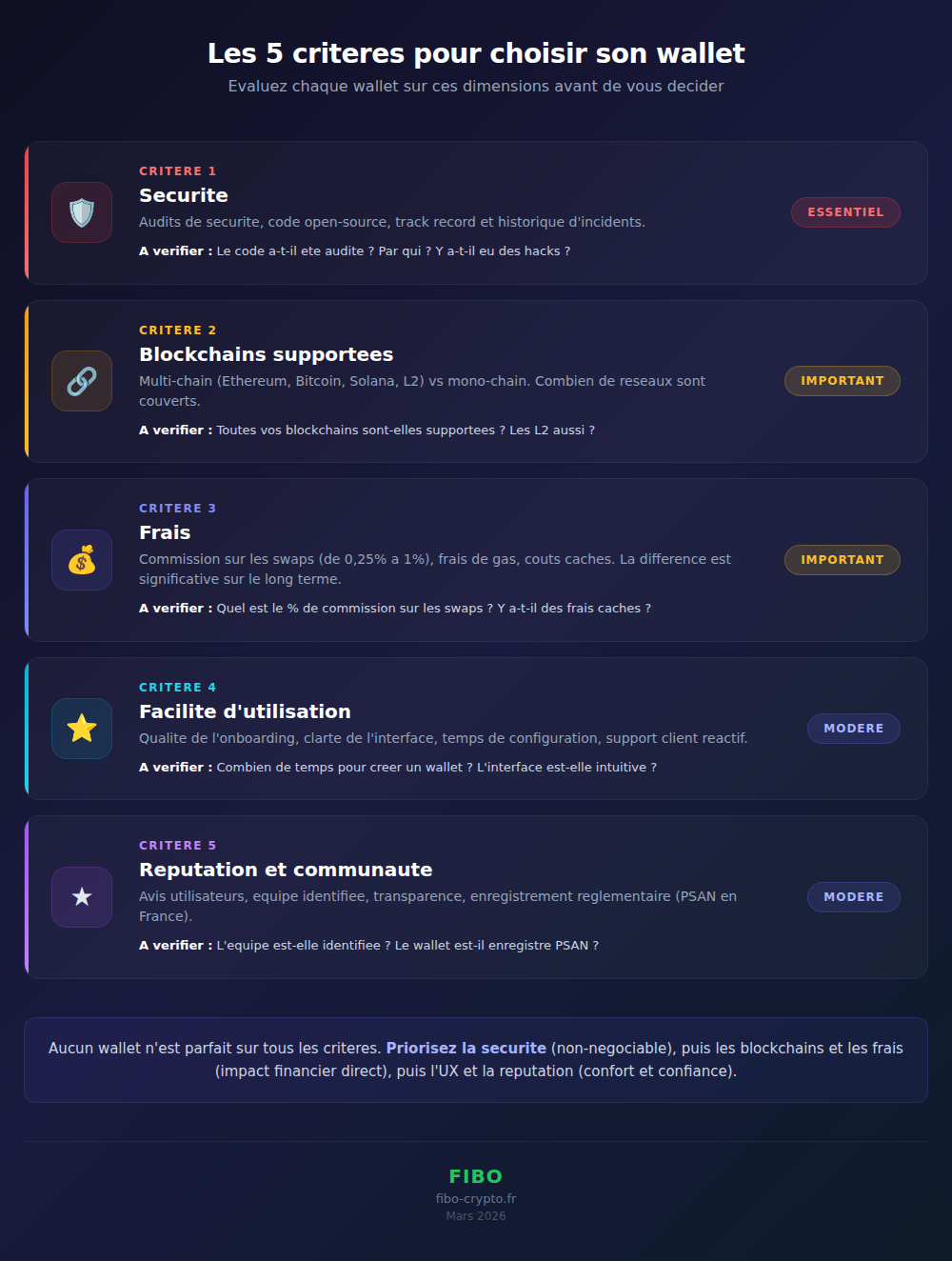
To choose a wallet suited to your needs, evaluate 5 fundamental criteria: security, supported blockchains, fees, ease of use, and reputation. No wallet will be perfect on all criteria — what matters is prioritizing based on your profile.
1. The security model (audits, open-source, track record)
This is the number one criterion, non-negotiable. Check: has the wallet’s code been audited by independent third parties (Trail of Bits, OpenZeppelin, Certora)? Is the wallet open-source (the code is public and verifiable)? What’s the track record — how long has it existed and have there been any security incidents? A wallet that’s been around for 3 years without incident inspires more confidence than a project launched 3 months ago.
2. Supported blockchains (multi-chain vs single-chain)
Some wallets only support a single blockchain (Electrum for Bitcoin, for example). Others are multi-chain and support Ethereum, Bitcoin, Solana, layer 2s (Base, Arbitrum, Polygon), and other networks. If you’re just starting out, a multi-chain wallet is strongly recommended: it avoids having to manage multiple different wallets.
3. Fees (swap fees, gas, commissions)
Fees vary enormously from one wallet to another. Gas (blockchain transaction fees) is the same for everyone, but wallets often add a commission on swaps (crypto-to-crypto exchanges). MetaMask and Phantom charge about 0.875%. Others, like Fibo, charge 0.25% — 3.5 times less. On $10,000 exchanged over the year, the difference is significant.
4. Ease of use (onboarding, interface, support)
User experience makes a huge difference, especially for beginners. How long does it take to create a wallet? Is the interface intuitive? Is there responsive customer support? Next-generation wallets (Fibo, Coinbase Smart Wallet) offer onboarding in under 30 seconds, with no seed phrase to write down. Older wallets (MetaMask) require more setup.
5. Reputation and community (reviews, history, transparency)
Check reviews on the stores (App Store, Google Play), the size of the community, and the transparency of the team behind the project. A wallet whose team is identified, based in a jurisdiction with a clear regulatory framework (EU under MiCA, US under SEC/FinCEN guidelines), and registered with a regulator offers additional guarantees. In Europe, the MiCA regulation (Markets in Crypto-Assets) now provides a harmonized licensing framework. In the US, state-level money transmitter licenses and FinCEN registration apply to crypto service providers.
| Criterion | What to check | Importance |
|---|---|---|
| Security | Audits, open-source, track record, past incidents | Essential |
| Blockchains | Multi-chain vs single-chain, supported L2s | Important |
| Fees | Swap commission, gas fees, hidden costs | Important |
| UX | Onboarding, interface, customer support | Moderate |
| Reputation | Reviews, team, regulatory registration | Moderate |
The 5 mistakes that cost beginners dearly
The most common mistakes among beginners are related to security and a lack of understanding of basic mechanisms. Each mistake below has cost real users thousands, sometimes millions of dollars. The good news: they’re all avoidable.
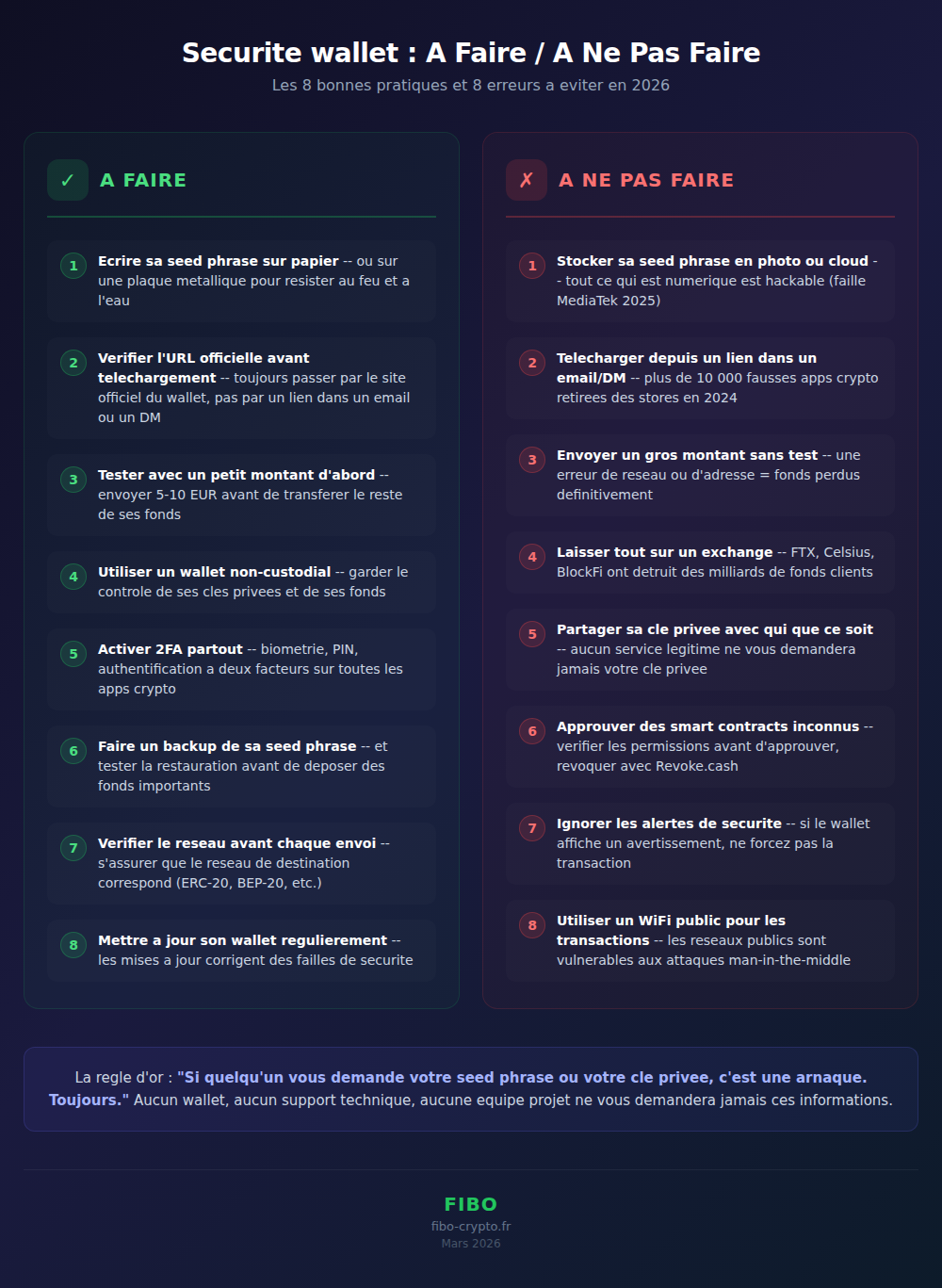
Mistake #1: Storing your seed phrase digitally
This is the number one mistake. Taking a photo of your seed phrase, writing it in the Notes app, emailing it “to yourself,” storing it in Google Drive or iCloud. Anything digital is hackable. In 2025, a critical vulnerability in MediaTek processors demonstrated that it was possible to extract a seed phrase in 45 seconds on roughly 25% of Android smartphones. If your seed phrase is in your photo gallery — which automatically syncs to the cloud — it’s exposed.
The solution: paper or metal, stored offline, in a secure location.
Mistake #2: Downloading a fake wallet
Fake wallets are a plague. Fraudulent applications mimic the interface of MetaMask, Trust Wallet, or other popular wallets to steal your private keys as soon as the wallet is created. In 2024, more than 10,000 fake crypto apps were removed from stores according to a Sophos report. Some had thousands of (fake) positive reviews.
The solution: always download from the wallet’s official website (not from a link in an email, a Twitter DM, or a Google ad). Check the exact developer name on the store.
Mistake #3: Sending to the wrong network
Sending ETH on the Ethereum network to a Binance Smart Chain address. Sending SOL to a Bitcoin address. Sending USDT as ERC-20 to a wallet expecting USDT as TRC-20. Result: your funds are permanently lost or extremely difficult to recover.
The solution: ALWAYS verify the network before sending. Do a test send with a small amount. If the wallet displays a network incompatibility warning, don’t force it.
Mistake #4: Not testing your backup
You wrote your seed phrase on a piece of paper. Perfect. But did you verify that it works? Some users discovered, when they actually needed it, that they had written an incorrect word, swapped two words, or that the paper had become illegible.
The solution: after creating your wallet and writing down your seed phrase, restore it immediately on another device (or by reinstalling the application) to verify your backup works. Do this before depositing significant funds.
Mistake #5: Approving permissions on malicious sites
Malicious smart contracts request excessive permissions: “approve this contract to spend an unlimited amount of your USDT.” If you approve without reading, the contract can drain your wallet. In 2025, “approval phishing” scams accounted for more than $1 billion in losses (source: Chainalysis).
The solution: read the permissions before approving. Use tools like Revoke.cash to revoke unused permissions. Only interact with dApps whose official URL you’ve verified.
Where to start, concretely?
Setting up your first wallet takes less than 5 minutes. The process is simple, but it differs depending on your current situation. Here are the two most common scenarios and the steps to follow for each.
Situation A: You already have crypto on an exchange
You’ve bought Bitcoin or Ethereum on Binance, Coinbase, or Kraken. Your crypto is on the exchange, in a custodial wallet. Here’s how to take back control:
- Choose a non-custodial wallet. For a beginner, a multi-chain mobile wallet is ideal. Fibo, Trust Wallet, or MetaMask Mobile are good choices.
- Install the application from the official website or the store (check the developer name).
- Create your wallet. Depending on the wallet you choose: write down your seed phrase (traditional wallet) or sign in with your email/Google (seedless wallet like Fibo).
- Secure your backup. Seed phrase on paper in a safe location, or verify that your recovery method works (email, passkey, biometrics).
- Do a test send. Send a small amount ($5-10) from the exchange to your new wallet. Make sure the network is correct. Wait for confirmation.
- Transfer the rest. Once the test send is confirmed, transfer the rest of your funds. Keep withdrawal fees in mind (each exchange withdrawal has a fixed cost).
Never transfer all of your funds in a single transaction. Always do a small test send first. The cost of an extra transfer (a few cents to a few dollars) is negligible compared to the risk of losing all your funds due to a network or address error.
Situation B: You’re starting from scratch
You’ve never bought crypto before. Here’s how to get started directly with a non-custodial wallet, without going through an exchange:
- Install a wallet that offers credit/debit card purchases (fiat on-ramp). Fibo, MetaMask, and Trust Wallet offer this via partners like Transak or MoonPay.
- Create your account in under a minute (email or social login for next-generation wallets).
- Buy your first crypto directly in the wallet with your credit/debit card or a bank transfer. Identity verification may be required (KYC) for fiat purchases.
- Secure your wallet: back up the seed phrase or verify your recovery method.
The first 3 days with your wallet
Day 1: Setup and security. Install the wallet, create your account, secure your backup. If you have a seed phrase, test the restore on another device. Enable all available security features: biometrics, PIN, 2FA if available. Take 15 minutes to explore the interface.
Day 2: First test send. Send a small amount from an exchange or buy $10-20 worth of crypto directly in the wallet. Familiarize yourself with the process: sending, receiving, checking on a blockchain explorer (Etherscan for Ethereum, Solscan for Solana). Understand gas fees.
Day 3: Explore the features. Try a swap (crypto-to-crypto exchange) in the wallet. If your wallet supports DeFi, explore yield options (lending, staking). Familiarize yourself with transaction notifications and history. You’re now autonomous.
Conclusion: your wallet, your financial freedom
Choosing a crypto wallet means choosing how you want to interact with your digital assets. It’s a fundamental decision that determines whether you entrust control of your funds to a third party or keep it yourself.
The lessons of recent years are clear. FTX, Celsius, BlockFi — billions of dollars in user funds vanished because those users had entrusted their keys to intermediaries. The principle “not your keys, not your coins” is not a slogan — it’s a financial reality validated by experience.
The good news is that in 2026, taking control has never been easier. Next-generation non-custodial wallets (seedless, with email or biometric login) offer an experience comparable to the best fintech apps, without sacrificing security. In less than 5 minutes, you can set up a wallet that truly belongs to you.
Start simple. A mobile wallet, a verified backup, a small amount to learn. Then explore. Crypto is a vast world, and your wallet is the gateway.
📚 Glossary
- Wallet: Software or device that stores your private keys and allows you to send, receive, and manage your cryptocurrencies. Does not directly contain your crypto — they remain on the blockchain.
- Private key: Secret cryptographic code that proves your ownership of your funds and allows you to sign transactions. Never share it. Irreplaceable if lost.
- Public key: Cryptographic identifier derived from your private key. Used to generate your receiving addresses. Can be shared safely.
- Seed phrase: A sequence of 12 or 24 words (BIP-39 standard) that represents your private key in readable form. Allows you to restore a wallet on any compatible device. If someone obtains your seed phrase, they have access to all your funds.
- Blockchain: A decentralized and immutable digital ledger on which all crypto transactions are recorded. Your cryptocurrencies exist on the blockchain, not in your wallet.
- Hot wallet: A wallet permanently connected to the Internet (mobile app, browser extension, desktop application). Convenient for everyday transactions, but more exposed to online risks.
- Cold wallet: A wallet disconnected from the Internet (hardware wallet, paper wallet). Offers maximum security against online attacks, recommended for long-term storage.
- Custodial: A model in which a third party (exchange, platform) holds your private keys on your behalf. You have an account, but not direct control of your funds. Risk: third-party bankruptcy (FTX, Celsius).
- Non-custodial: A model in which you alone hold your private keys. The wallet provider has no access to your funds. “Not your keys, not your coins” = non-custodial is recommended.
- Hardware wallet: A physical device dedicated to storing private keys offline. The most well-known: Ledger, Trezor, Tangem. Offers the highest level of security for long-term storage.
- DeFi: Decentralized finance. A set of financial protocols running on blockchain without intermediaries: lending, borrowing, trading, insurance. Accessible via non-custodial wallets.
- Smart contract: An autonomous program deployed on a blockchain that executes automatically when predefined conditions are met. DeFi protocols operate through smart contracts.
- Gas: Transaction fees paid to blockchain validators to process and confirm your transaction. The amount varies based on the network and congestion. On Ethereum, gas is paid in ETH.
- Multi-chain: A wallet’s ability to support multiple blockchains simultaneously (Ethereum, Bitcoin, Solana, etc.). Avoids having to manage multiple separate wallets.
- dApp: A decentralized application running on a blockchain. Examples: Uniswap (exchange), Aave (lending), OpenSea (NFT). Accessible via a compatible non-custodial wallet.
- Passkey: A cryptographic key stored on your device’s security chip (Secure Enclave on iPhone, Titan on Android). Unlocked by biometrics (fingerprint, Face ID). Phishing-resistant because the key never leaves the device.
- Regulatory registration: Mandatory licensing or registration for companies providing crypto asset services. In Europe, the MiCA regulation (Markets in Crypto-Assets) provides a harmonized framework. In the US, companies must register with FinCEN and obtain state-level money transmitter licenses. A sign of regulatory compliance.
- Token: A digital asset created on an existing blockchain (as opposed to a native cryptocurrency like Bitcoin or Ether). Tokens follow technical standards such as ERC-20 (Ethereum) or SPL (Solana).
Frequently Asked Questions
What is the best crypto wallet for a beginner?
The best wallet for a beginner is a non-custodial multi-chain mobile wallet that’s easy to set up and has good support. For those who want maximum simplicity, Fibo offers a seedless onboarding in under 30 seconds (sign in with email or Google). For those who prefer the traditional approach, Trust Wallet and MetaMask Mobile are solid options with large communities. The key criterion: choose a non-custodial wallet to keep control of your private keys from the start.
What exactly is a crypto wallet?
A crypto wallet is software or a device that stores your private keys — the cryptographic codes that prove you own your funds on the blockchain. Despite what the name suggests, your cryptocurrencies are not “in” the wallet: they exist on the blockchain. The wallet holds the keys that allow you to access and move them. It’s like a keychain for a safe whose contents are stored elsewhere.
Do you absolutely need a crypto wallet?
Technically no — if you buy crypto on an exchange like Binance or Coinbase, it’s stored in the platform’s custodial wallet. But this means you don’t control your private keys. In the event of an exchange bankruptcy (like FTX in 2022), you risk losing your funds. A non-custodial wallet is strongly recommended for anyone who wants to maintain real control over their assets and secure them for the long term.
Custodial or non-custodial wallet: which should you choose?
For an absolute beginner taking their first steps, a custodial wallet (exchange) may be acceptable temporarily. But as soon as possible, migrate to a non-custodial one. A non-custodial wallet gives you total control of your keys: no one can freeze your funds, no intermediary can go bankrupt with your money. In 2026, non-custodial wallets are just as easy to use as custodial ones thanks to new technologies (passkeys, social login).
How do you secure your crypto wallet?
Five essential practices: (1) Back up your seed phrase on paper or metal, never digitally. (2) Test your backup by restoring your wallet before depositing significant funds. (3) Enable all available security features (biometrics, PIN, 2FA). (4) Only download from official sources. (5) Never share your private key or seed phrase with anyone. For amounts over $5,000, consider a hardware wallet as a second layer of security.
What is the seed phrase and why does it matter?
The seed phrase is a sequence of 12 or 24 randomly generated words following the BIP-39 standard. It represents your private key in a readable form. If you lose your phone, your seed phrase allows you to restore your wallet and recover all your funds on a new device. If you lose both your seed phrase and your phone, your funds are permanently lost. There is no recovery service. That’s why storing it securely is critical.
Can you have multiple crypto wallets?
Yes, and it’s even recommended by many security experts. You can use a mobile wallet for daily transactions and a hardware wallet for long-term storage. You can also have separate wallets for DeFi and for simple storage, limiting your exposure in case a smart contract is compromised. Each wallet will have its own private keys and its own addresses.
Is a crypto wallet free?
Most software wallets (mobile apps and extensions) are free to download and use: MetaMask, Fibo, Trust Wallet, Phantom, Rabby. The fees are in the transactions: gas fees (paid to the blockchain) and swap fees (wallet commission on exchanges). Hardware wallets have a purchase cost: Ledger Nano S Plus (~$80), Ledger Nano X (~$150), Trezor Model T (~$180), Tangem (~$70 for a pack).
What happens if you lose your seed phrase?
If you lose your seed phrase AND your access to the wallet (broken phone, uninstalled app), your funds are permanently lost. No one can recover them — not the wallet provider, not a tech support team, not the blockchain itself. According to Chainalysis, 3.79 million Bitcoin (over $120 billion) are lost forever, primarily for this reason. That’s why seedless wallets (Fibo, ZenGo) are an increasingly popular alternative.
Are seedless wallets safe?
Yes, and in some cases safer than a traditional wallet. Seedless wallets use advanced technologies: MPC (ZenGo — 1.5M users, zero hacks since 2018), TEE + Shamir (Privy/Fibo — AWS Nitro secure enclave), passkeys (Coinbase Smart Wallet). These technologies eliminate the main point of failure — a seed phrase written on paper or stored digitally. The private key is fragmented and never stored in one piece, making theft structurally more difficult.
📰 Sources
This article is based on the following sources:
- Ethereum.org — Wallets — Official Ethereum guide on wallets: types, security, how to choose
- Bitcoin.org — Secure Your Wallet — Official best practices for securing a Bitcoin wallet
- Ledger Academy — What Is a Crypto Wallet — Ledger’s educational guide on how wallets work
- MetaMask — Documentation — Official documentation for the world’s most widely used wallet
- Chainalysis — Crypto Crime Report 2025 — Data on crypto losses, scams, and wallet theft
- European Commission — MiCA Regulation — European regulatory framework for crypto assets and service providers
- Privy — Security Architecture — Technical architecture of Privy’s TEE + Shamir wallets
- CoinGecko — Global Crypto Market Data — Statistical data on wallets, market cap, and adoption
- DefiLlama — TVL & Protocols — Reference data on total value locked in DeFi protocols
- FinCEN — MSB Registrant Search — US regulatory registration for money service businesses including crypto service providers
How to cite this article: Fibo Crypto. (2026). Crypto Wallet for Beginners: The Complete Guide to Understand and Choose (2026). Retrieved from https://fibo-crypto.fr/en/blog/crypto-wallet-beginner-where-to-start
The simplest way to buy, swap and manage your crypto
Join the first users and get priority access. No seed phrase, fees 3.5x lower, built-in DeFi yield.
Get early access →